
How To Understand The Images On Fish Finder Screen - Easy Guide
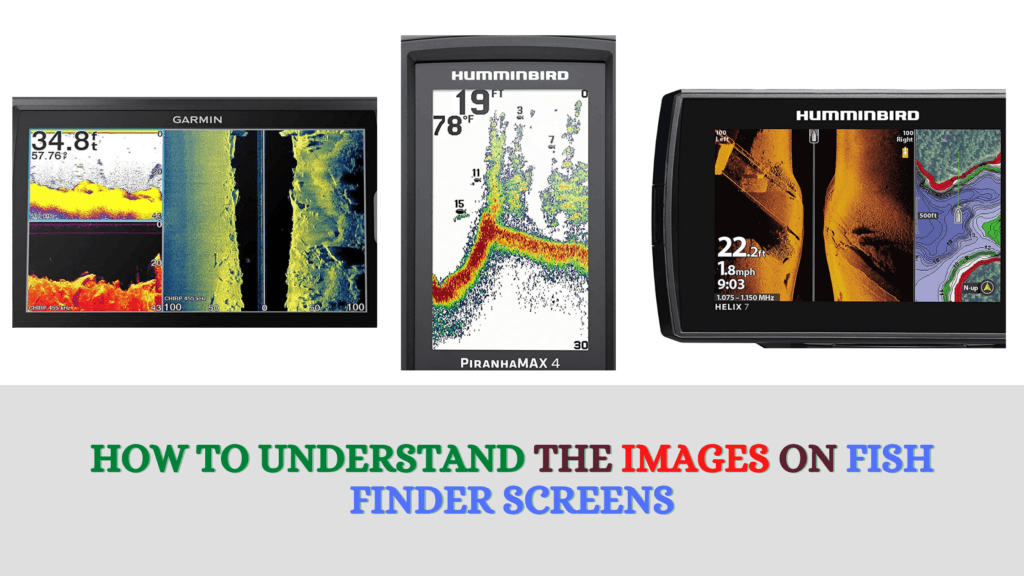
The important thing to highlight is that there is no appropriate description of the basic information regarding SONAR images. How to understand the images on the fish finder screen? You can easily find the answer to the previous query in this article. It covers all essential aspects to train you proficiently in detecting fish finder SONAR images and understand them instantly.
From fish arches towards hooks, let us find out the best factors about portable fish finders regarding “Interpreting SONAR images”. Instead of getting an education about understanding the images on the fish finder screen from multiple sites and videos, you can take a read about it here. Here, everything sums up so perfectly that you can enjoy it properly while gaining information.
Introduction
There is no use of the portable fish finder by lacking the knowledge about understanding SONAR images efficiently. In this article, you can grasp some basic information along with some pro technical aspects as well. Get ready to read your fish finder exceptionally by using the images information on it as an expert!
Being a pro angler, you need to go through the information on SONAR images understanding. Otherwise, it will be just an unfamiliar language for you that you cannot understand in a simple language. Before diving into the info of the fish finders, prepare your mind to expect something stunning, whether you are a novice or professional angler!
Detecting Water Objects On The Display Screen:
From analyzing some basic fishing things towards maximizing your experience, let us dive into this deeper. First, there is a SONAR cone. It shoots the pulse down to the bottom and bounces back up. That is your SONAR reading cone. It gives you a sign that fish are located under your boat within 10 feet of you in 30 feet.
When you are rowing in your boat to find a fish, you can see some red arches on your fish finder. And these are nothing but fish that will be your prey! The reason behind the arch’s appearance is that there is a varying distance between fish and transducer when you are passing by it. Hence, it will show that distance by changing the arches’ size accordingly. You can scroll the fish finder now to check more things under the water like other water objects.
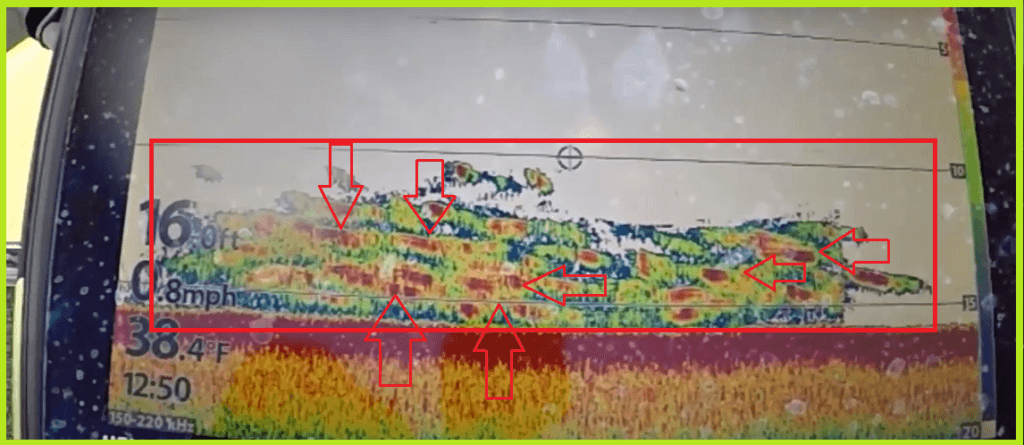
If an arch/line is constant there with no changing, it simply means that fish is underneath your boat. Resultantly, it will show some bait and different rocks to ensure which objects can be the obstacles in you and fish there! You can tune the sensitivity of the fish finder screen view to adjust it. It means that you can view more clearly if you set the buttons according to the brightness you are facing.
Recognizing & Determining Fish Size:
One more fascinating feature is that you can sometimes show the size of fish by viewing the arches in the rock bottom, etc. You can predict the fish where it is currently positioning depending on the arch height and its size by the color. Wow, it is a good thing, right!
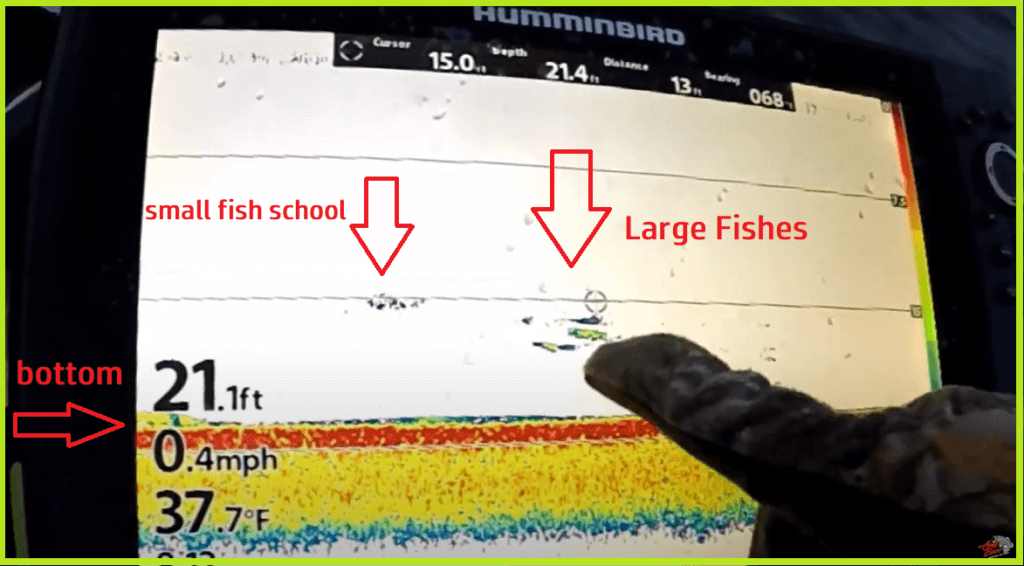
The thick fish arch means thicker fish. And transducer returns echo that will affect the size of the fish. The more powerful the echo is, means bigger the fish size! It is because it will display high-intensity color on the fish finder screen.
Mistakes You Should Avoid As Anglers & Some Key Points:
- When you learn some new aspects regarding images understanding in the fish finder, you should master them at first. Then, you can take a firm grip on some new features as well. Anglers mostly prefer to do advanced-level things first without knowing the basics as a priority.
- Most novice folks fond of fishing do not give importance to underwater structures. They start fishing just with the concepts of SONAR technology and arches, etc. You need to know that vertical lines on your fish finder display point out towards vegetation and weeds. You should not miss depressions and points also if you want to fish like a pro.
- Try to put your best efforts into covering as much water as you can by spending a lot of time fishing! Most anglers do not strive to hunt much of the water when it is time to fish. It will directly impact their understanding capability of SONAR images and signs. As far as the matter of the question, how to understand the images on fish finder screen? The simple reply is that after knowing the basics of fish finder images, it is up to you to decide. What level of fishing do you want for yourself?
- You can get information from this article as a beginner or some tips as a pro. But, the crucial thing will still be your own time that you will spend on the water with your best fish-finding gadget. It will simply give you more experience of learning its usability and functionality by making more mistakes.
FAQs:
Q: How can you read the down-imaging & side-imaging fish finder screen?
Down imaging is unique as compared to traditional SONAR. And as the name shows, its beam goes downward that anglers can see on their fish finder screen. You can observe the hard bottom as a soft one in a somehow brighter way on your screen.
However, the beam in side-imaging is at the side, and it indicates in the same way. It will show you the current location of the fish also to ensure its acute position. You can get to know the distance between your boat/kayak & fish by it with no worry!
Final Verdict:
There is no doubt in claiming that you can fish without a fish finder. But you cannot get accurate water depth, the temperature of the water, bottom topography, etc. And these things are essential for pro anglers & for those who fish as a hobby. One thing is evident that if you do not know how to understand the images on the fish finder screen, you lose 80% of the fundamental aspects of the fishing experience there. Without understanding the images on a fish finder, it is the same as reading a book without knowing its core. In a nutshell, learn these things by spending your most time fishing by taking general things in mind that I have illustrated in this article. Kindly give it a read, and you are good to go with some basic things to do or not. Have fun while fishing!
You May Also Like:
5 Best Garmin Fish Finders – Check Garmin on Amazon
5 Best Lawrance Fish Finders – Check Prices on Amazon